Child theme admin pages and menu
Once installed, you can access the Child Theme menu in the WordPress admin panel sidebar, after Appearance.
- Navigate to any module through the admin panel sidebar submenu or use the top menu in any admin child theme pages.
- Toggle the debugger panel when debug mode is enabled through the WordPress top bar button in admin panel and frontend (only allowed user roles).
- Check admin child theme page notifications (like debug mode enabled) and access quick links.
- Toggle the admin child theme pages sidebar to full width if you need more space with generators or code editor panels.
Child theme admin panels usage
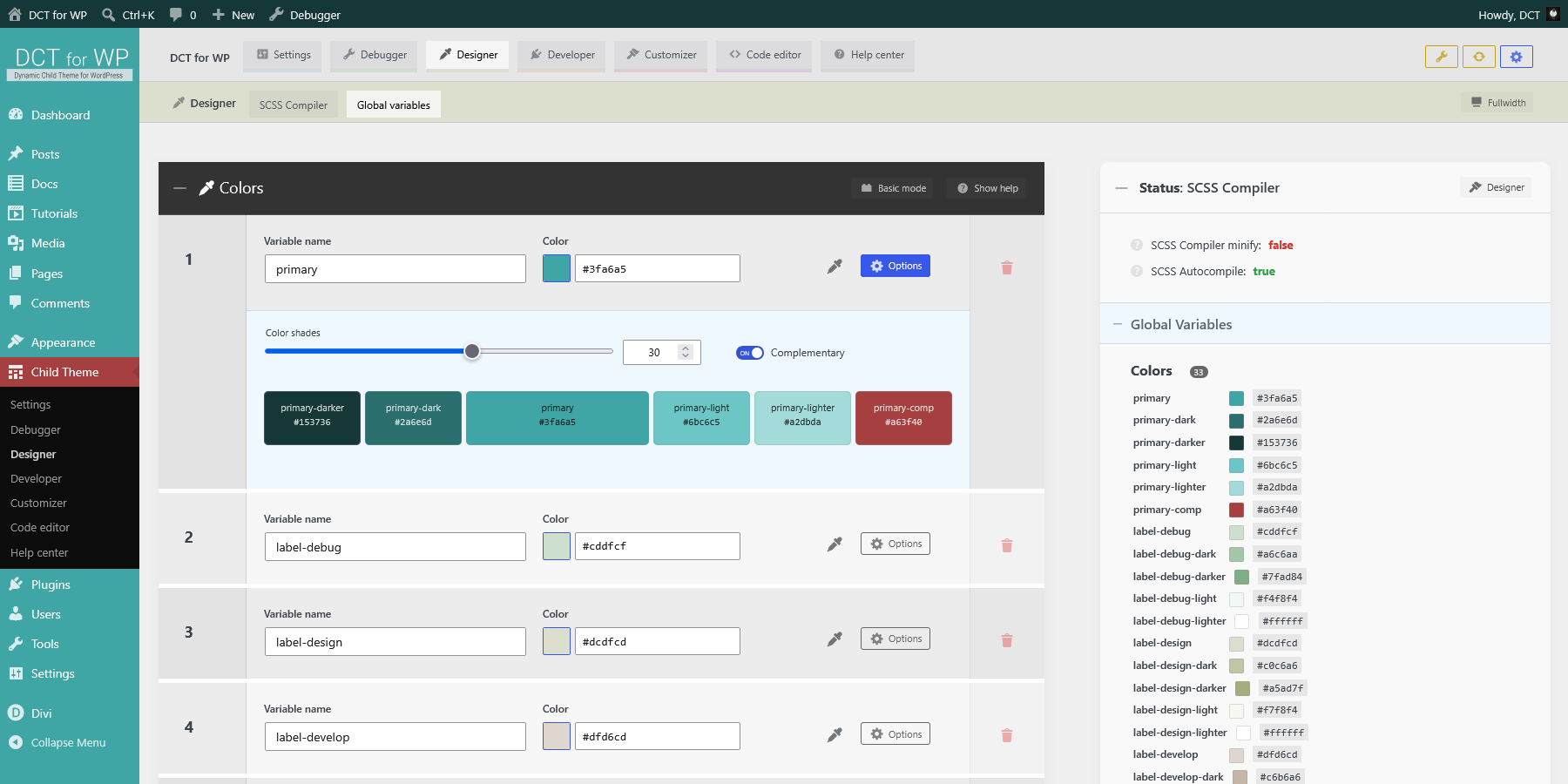
Almost every admin child panel has these attributes:
- Collapse and expand by clicking on the title bar.
- Show contextual help about related panels from the title bar button.
- Switch to basic and advanced mode from the title bar button.
- Basic mode shows generator lists with items that can be added, sorted and removed.
- Updating the panel in basic mode will save theme mods, generate code, update related custom files and compile SCSS if required.
- Advanced mode allow updating related custom files directly with the code editor.
- Updating the panel in advanced mode will update related custom files with code editor contents. Related theme mods will not be updated.
- The reset panel button will reset the related theme mod and custom file to the default contents.