
About settings
Your content goes here. Edit or remove this text inline or in the module Content settings. You can also style every aspect of this content in the module Design settings and even apply custom CSS to this text in the module Advanced settings.
Dashboard
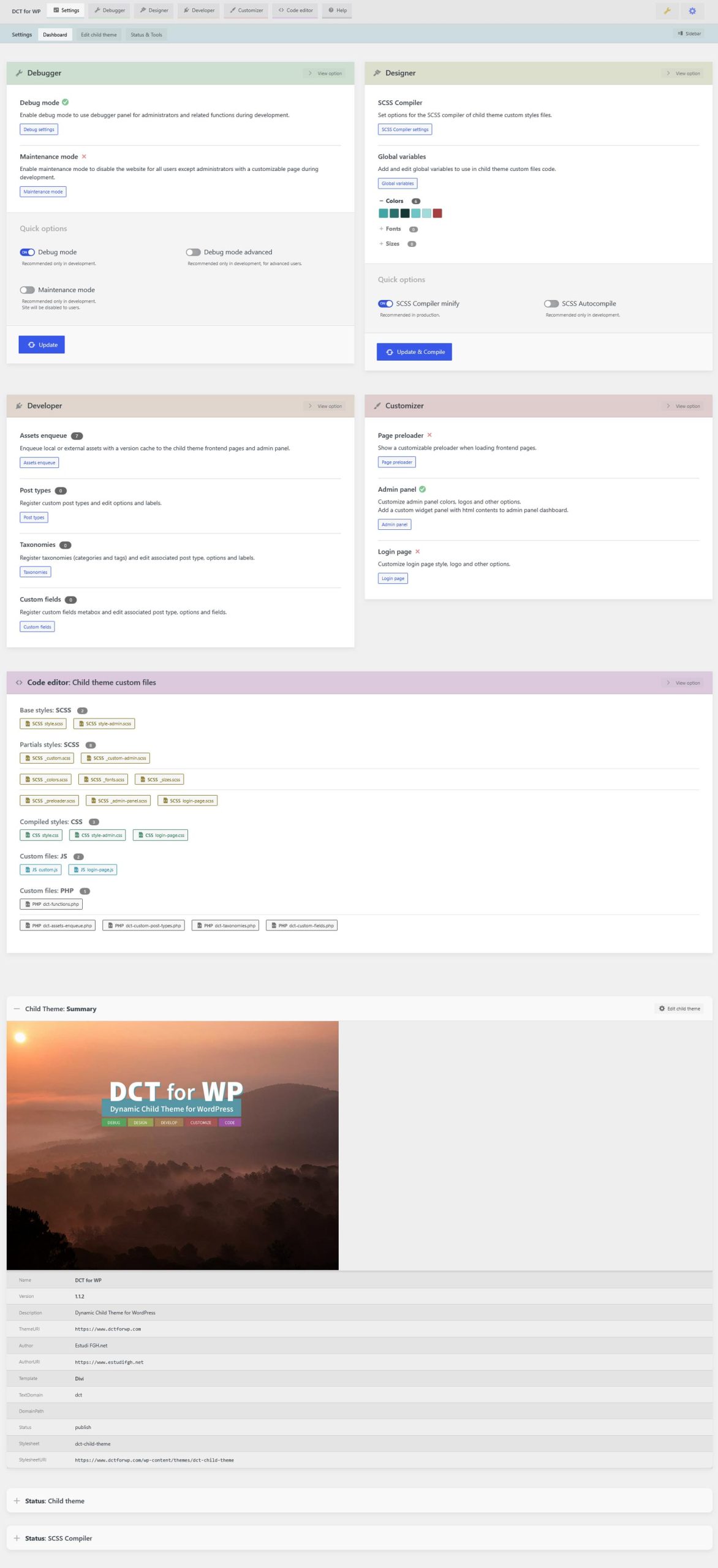
Child theme dashboard that provides quick options, current status and general information.
Edit child theme info
Edit the current child's theme basic information, like name, version, template and author.
- Theme name: Name of current child theme.
- Theme version: Version of current child theme. Used for cache purposes on assets enqueue.
- Theme description: Short description for current child theme.
- Theme template: Parent theme used by current child theme. Select any installed theme to use as template.
- Theme url: Website related to current child theme.
- Theme auhor: Child theme author name and website.
On update: Child theme base
style.scss file will be updated and compiled with new theme information.On reset: Child theme base
style.scss file will be reset and compiled with default settings and template twentytwentyfiveEdit child theme screenshot
Update the current child theme preview screenshot, used in menu Appearance: Themes.
Click on preview image to select/upload a custom image from the media library.Recommended image format and size: JPG | 1200 x 900px
On update/reset: Selected/default image will be copied to child theme's folder, replacing current file
screenshot.jpgStatus & Tools
Child theme and SCSS compiler current status, general information and tools.
Status: Child theme
Summary
- NameDCT for WP
- Version1.1.5
- DescriptionDynamic Child Theme for WordPress v1.1.5
- ThemeURI
https://www.dctforwp.com - AuthorEstudi FGH.net
- AuthorURI
https://www.estudifgh.net - TemplateDivi
- TextDomaindct
- DomainPath
- Statuspublish
- Stylesheetdct-child-theme
- StylesheetURI
https://www.dctforwp.com/wp-content/themes/dct-child-theme
Theme object $dct
$dct contains information about your child theme, environment and current page that can be used in custom JS and PHP code.{
"debug": {
"enabled": true,
"advanced": false,
"maintenance": false
},
"scss_compiler": {
"minify": false,
"autocompile": true
},
"colors": {
"primary": "#3fa6a5",
"primary-dark": "#2a6e6d",
"primary-darker": "#153736",
"primary-light": "#6bc6c5",
"primary-lighter": "#a2dbda",
"primary-comp": "#a63f40"
},
"fonts": [],
"sizes": [],
"assets": {
"css": [
"dct-style-admin",
"dct-style"
],
"js": [
"dct-base-js",
"dct-admin-js",
"gsap-min-js",
"ScrollTrigger-min-js",
"Draggable-min-js",
"InertiaPlugin-min-js",
"custom-js"
]
},
"customizer": {
"preloader": true,
"admin_panel": true,
"login_page": true
},
"theme": {
"Name": "DCT for WP",
"Version": "1.1.5",
"Description": "Dynamic Child Theme for WordPress v1.1.5",
"ThemeURI": "https://www.dctforwp.com",
"Author": "Estudi FGH.net",
"AuthorURI": "https://www.estudifgh.net",
"Template": "Divi",
"TextDomain": "dct",
"DomainPath": "",
"Status": "publish",
"Stylesheet": "dct-child-theme",
"StylesheetURI": "https://www.dctforwp.com/wp-content/themes/dct-child-theme"
},
"post": {
"post_title": "Settings",
"post_id": 91,
"post_type": "page",
"post_status": "publish",
"post_date": "09/06/2026",
"post_author": ""
},
"user": {
"user_login": false,
"user_id": 0,
"user_name": false,
"user_email": false,
"user_roles": null
},
"conditionals": {
"is_admin": false,
"is_blog_admin": false,
"is_login": false,
"is_front_page": false,
"is_home": false,
"is_singular": true,
"is_single": false,
"is_page": true,
"is_archive": false,
"is_category": false,
"is_tag": false,
"is_date": false,
"is_attachment": false,
"is_author": false,
"is_page_template": false,
"is_paged": false,
"is_post_type_archive": false,
"is_search": false,
"is_404": false,
"is_ssl": true
},
"environment": {
"Site URL": "https://www.dctforwp.com",
"Theme basepath": "https://www.dctforwp.com/wp-content/themes/dct-child-theme",
"Theme name": "DCT for WP",
"Theme version": "1.1.5",
"Wordpress version": "7.0.1",
"PHP version": "8.2.31"
},
"language": {
"locale": "en_US",
"user_locale": "en_US"
}
}Theme mods
dct_debug_modeEnables debugger panel for administrators in frontend and admin panel, with PHP and JS logs, post queries, child theme status and other information.
Recommended only in development.
dct_debug_mode 2{
"enabled": true,
"advanced": false
}dct_maintenance_modeEnable maintenance mode to disable the website for all users except administrators with a customizable page during development.
Recommended only in development.
Site will be disabled to users.
dct_maintenance_mode 2{
"enabled": false,
"options": {
"background-color": "#f0f0f1",
"background-gradient": "none",
"background-gradient-direction": 0,
"background-gradient-1-color": "#b8dd87",
"background-gradient-1-position": 0,
"background-gradient-2-color": "#6f7adc",
"background-gradient-2-position": 100,
"background-gradient-above-image": false,
"background-image-type": "none",
"background-image-url": "",
"background-image-size": "cover",
"background-image-position": "center",
"background-image-repeat": "no-repeat",
"background-image-blend": "normal",
"background-border-width": "0px",
"background-border-color": "#CCC",
"background-border-style": "solid",
"message-content": "<h1>Under maintenance!</h1>\n<p>We are working on the website, sorry for the inconvenience.</p>\n",
"message-text-color": "#111",
"message-title-color": "#111",
"image-url": "",
"image-width": "200px",
"image-after-text": false,
"custom-css": "#error-page .dct-maintenance-mode-wrapper {}\n#error-page .dct-maintenance-mode-wrapper h1 {}\n#error-page .dct-maintenance-mode-wrapper img.dct-maintenance-mode-logo {}\n"
}
}dct_scss_compiler 2{
"minify": false,
"autocompile": true
}dct_variables_colors 2{
"advanced": false,
"options": [
{
"name": "primary",
"value": "#3fa6a5",
"shade": 30,
"complementary": true,
"versions": {
"base": "#3fa6a5",
"dark": "#2a6e6d",
"darker": "#153736",
"light": "#6bc6c5",
"lighter": "#a2dbda",
"comp": "#a63f40"
}
}
]
}dct_variables_fonts 2{
"options": [],
"advanced": false
}dct_variables_sizes 2{
"options": [],
"advanced": false
}dct_developer_assetsEnqueue local or external assets with a version cache to the child theme frontend pages and admin panel.
dct_developer_assets 2{
"options": [
{
"url": "https://cdn.jsdelivr.net/npm/gsap@3.13.0/dist/gsap.min.js",
"type": "js",
"local": false,
"version": "child",
"front": true,
"admin": false,
"position": 1,
"error": ""
},
{
"url": "https://cdn.jsdelivr.net/npm/gsap@3.13.0/dist/ScrollTrigger.min.js",
"type": "js",
"local": false,
"version": "child",
"front": true,
"admin": false,
"position": 2,
"error": ""
},
{
"url": "https://cdn.jsdelivr.net/npm/gsap@3.13.0/dist/Draggable.min.js",
"type": "js",
"local": false,
"version": "child",
"front": true,
"admin": false,
"position": 3,
"error": ""
},
{
"url": "https://cdn.jsdelivr.net/npm/gsap@3.13.0/dist/InertiaPlugin.min.js",
"type": "js",
"local": false,
"version": "child",
"front": true,
"admin": false,
"position": 4,
"error": ""
}
],
"advanced": false
}dct_developer_cpt 2{
"options": [
{
"name": "documentation",
"label": "Documentation",
"description": "Docs, help and tips",
"args": {
"capability_type": "page",
"supports": [
"title",
"editor",
"revisions",
"author",
"excerpt",
"thumbnail",
"custom-fields"
],
"hierarchical": true,
"public": true,
"publicly_queryable": true,
"show_ui": true,
"show_in_rest": true,
"show_in_nav_menus": true,
"has_archive": true,
"can_export": true,
"exclude_from_search": false,
"rewrite": {
"slug": "",
"feeds": true,
"with_front": true
},
"menu_position": 0,
"menu_icon": "dashicons-archive"
},
"labels": []
}
],
"advanced": false
}dct_developer_taxRegister taxonomies (categories and tags) and edit associated post type, options and labels.
dct_developer_tax 2{
"options": [],
"advanced": false
}dct_developer_cf 2{
"options": [],
"advanced": false
}dct_customizer_preloader 3{
"enabled": true,
"advanced": false,
"options": {
"background-color": "#f0f0f1",
"background-gradient": "linear",
"background-gradient-direction": "0",
"background-gradient-1-color": "$primary-darker",
"background-gradient-1-position": "0",
"background-gradient-2-color": "$primary",
"background-gradient-2-position": "100",
"background-image-type": "none",
"background-image-url": "",
"background-image-size": "cover",
"background-image-position": "center",
"background-image-repeat": "no-repeat",
"background-image-blend": "normal",
"background-gradient-above-image": false,
"background-border-width": "0px",
"background-border-color": "#CCC",
"background-border-style": "solid",
"image-type": "preset:dots-bounce.svg",
"image-url": "",
"image-color": "rgba(255,255,255,0.63)",
"image-width": "113px",
"image-left": "50%",
"image-top": "50%",
"image-animation": "none",
"image-animation-duration": "2s",
"out-animation": "slide-bottom",
"out-animation-duration": "0.2s"
}
}dct_customizer_admin_panel 3{
"enabled": true,
"advanced": false,
"options": {
"sidebar-background-color": "$primary",
"sidebar-text-color": "#ffffff",
"sidebar-submenu-color": "$primary-darker",
"sidebar-submenu-text-color": "#ffffff",
"sidebar-featured-color": "$primary-comp",
"sidebar-featured-text-color": "#FFF",
"sidebar-image-url": "https://www.dctforwp.com/wp-content/uploads/2026/04/Logo-DCT-for-WP-positiu.svg",
"sidebar-image-height": "60px",
"sidebar-folded-image-url": "",
"sidebar-folded-image-height": "40px",
"topbar-background-color": "#111212",
"topbar-text-color": "#f0f0f1",
"topbar-wp-links": false,
"footer-text": "Theme by <b>{{AUTHOR}}</b> \u00a9 {{YEAR}}",
"footer-version-child": true,
"footer-version-wp": true
}
}dct_customizer_dashboard_widgetAdd a custom widget panel with html contents to admin panel dashboard.
dct_customizer_dashboard_widget 3{
"enabled": true,
"advanced": false,
"options": {
"title": "Quick links",
"content": "<h4>Contents</h4>\n<a class=\"button button-large button-primary\" href=\"post-new.php\">New post</a>\n<a class=\"button button-large\" href=\"edit.php\">Posts</a>\n<a class=\"button button-large\" href=\"edit.php?post_type=page\">Pages</a>\n<hr>\n<p>Settings & Appearance</p>\n<a class=\"button button-primary\" href=\"options-general.php\">General</a>\n<a class=\"button\" href=\"nav-menus.php\">Menus</a>\n<a class=\"button\" href=\"admin.php?page=dct-settings\">Child theme</a>"
}
}dct_customizer_login_page 3{
"enabled": true,
"advanced": false,
"options": {
"background-color": "#f0f0f1",
"background-gradient": "none",
"background-gradient-direction": "0",
"background-gradient-1-color": "#b8dd87",
"background-gradient-1-position": "0",
"background-gradient-2-color": "#6f7adc",
"background-gradient-2-position": "100",
"background-image-type": "preset:Gavarres-fogs-8.jpg",
"background-image-url": "https://www.dctforwp.com/wp-content/themes/dct-child-theme/images/backgrounds/Gavarres-fogs-8.jpg",
"background-image-size": "cover",
"background-image-position": "center",
"background-image-repeat": "no-repeat",
"background-image-blend": "normal",
"background-gradient-above-image": false,
"background-border-width": "0px",
"background-border-color": "#CCC",
"background-border-style": "solid",
"image-type": "custom",
"image-url": "https://www.dctforwp.com/wp-content/uploads/2026/04/Logo-DCT-for-WP-negatiu.svg",
"image-width": "180px",
"image-height": "75px",
"form-background-color": "rgba(255,255,255,0.84)",
"form-border-width": "0px",
"form-border-color": "#c3c4c7",
"form-border-style": "solid",
"form-text-color": "$primary-darker",
"form-button-color": "$primary-comp",
"form-button-text-color": "#FFF",
"link-text-color": "#ffffff",
"link-lost-password": true,
"link-back-home": true,
"link-language-switcher": true
}
}et_pb_css_syncedRelated to parent theme mods
sidebars_widgetsRelated to parent theme mods
{
    "time": 1784200724,
    "data": {
        "wp_inactive_widgets": [
            "block-2",
            "block-3",
            "block-4",
            "block-5",
            "block-6"
        ],
        "sidebar-1": [],
        "sidebar-2": [],
        "sidebar-3": [],
        "sidebar-4": [],
        "sidebar-5": [],
        "sidebar-6": [],
        "sidebar-7": []
    }
}nav_menu_locationsRelated to parent theme mods
[]
custom_css_post_idRelated to parent theme mods
et_updated_layouts_built_for_post_typesRelated to parent theme mods
Custom files
wp-content/themes/dct-child-theme/custom/Any custom file or extension subfolder deleted with FTP will be regenerated with the default template on next load.
Debugger errors log
dct_debug(level:"error")Status: SCSS Compiler
Global Variables
#3fa6a5#2a6e6d#153736#6bc6c5#a2dbda#a63f40Source SCSS and compiled CSS files
Tools: Reset theme mods
Remove current child theme mods fields from database and regenerate with default values.
Select a group type or single theme mod to reset, useful when changing template to remove parent theme related fields.On update: Selected theme mods will be deleted, and regenerated with default values on next load if required.
Tools: Reset custom files
Delete custom files and reset to default templates.
Select a group type or single custom file to reset.
wp-content/themes/dct-child-theme/custom/Any custom file or extension subfolder deleted with FTP will be regenerated with the default template on next load.
On update: Selected custom files will be deleted and regenerated with default template.